7 Prompt Mistakes That Give You Bad AI Answers (and How to Fix Them)
It’s tempting to blame the tool. Sometimes that’s fair. But far more often, the answer went wrong before you pressed Enter. The prompt left too much to guess, and the AI guessed the most average thing possible.
The encouraging part is that the same handful of mistakes cause most bad answers, and every one of them takes seconds to fix. Below are the seven that show up again and again, each with a real “before and after” you can copy.
The 7 most common prompt mistakes: (1) being too vague, (2) leaving out context, (3) not saying what format you want, (4) cramming several tasks into one prompt, (5) not giving an example, (6) accepting the first answer instead of refining it, and (7) trusting the output without checking it. Fixing the first three alone will noticeably improve most answers.
Why small prompt mistakes cause big problems
AI assistants like ChatGPT, Claude and Gemini are built on large language models. In simple terms, they predict the most likely helpful response to what you wrote. When your prompt is detailed, “most likely helpful” lines up with what you actually need. When it’s thin, the model fills the gaps with safe, generic choices.
That’s why two people can use the same tool on the same day and walk away with very different opinions of it. The tool didn’t change. The prompts did.
Mistake 1: Being too vague
This is the big one. Short prompts feel efficient, but they hand every decision to the AI: the angle, the audience, the depth, the tone.
Before:
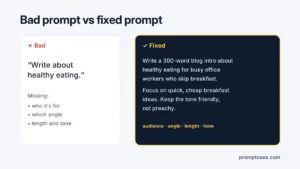
Write about healthy eating.
After:
Write a 300-word blog intro about healthy eating for busy office workers who skip breakfast. Focus on quick, cheap breakfast ideas and keep the tone friendly, not preachy.
Quick fix: Before sending, ask yourself, “Could this prompt mean five different things?” If yes, narrow it down. Add who it’s for, what angle to take and how long it should be.
Mistake 2: Leaving out context
The AI doesn’t know you. It doesn’t know you’re a teacher, that your boss hates long emails, or that your readers are complete beginners. Anything you know that would change the answer belongs in the prompt.
Before:
Explain what an API is.
After:
I run a small bakery and my web developer keeps mentioning an "API" for our online orders. Explain what an API is in plain language, using a restaurant or bakery example, so I can follow the conversation.
Quick fix: Add one sentence that starts with “I am…” or “This is for…”. That single line often changes the answer more than anything else.
Mistake 3: Not saying what the answer should look like
If you don’t specify format, you get the AI’s default, which is often a long block of text with a predictable intro and summary. Then you spend time cutting and rearranging.
Before:
Give me tips for a job interview.
After:
Give me 5 job interview tips for a first-time applicant, as a numbered list. One sentence per tip, then one short example of what to say.
Quick fix: Name the shape: list, table, email, bullet points, a single paragraph, under 100 words. AI tools are good at following format instructions, so use that.
Mistake 4: Asking for too much at once
“Write my blog post, five social posts, an email newsletter and a title list.” One prompt, four jobs. The result is usually four half-finished pieces, each weaker than if you’d asked for it alone.
Before:
Write a blog post about remote work, plus 5 tweets, a newsletter and 10 title ideas.
After (step 1 of 3):
Give me 10 title ideas for a blog post about remote work for first-time managers. Mix how-to, list and question styles.
Then pick a title, ask for an outline, then ask for the post. Social posts come last, based on the finished article.
Quick fix: One prompt, one main job. Chain the steps in the same chat so the AI keeps the context.
Mistake 5: Not giving an example
Describing a style is hard. Showing one is easy. If you want a particular tone, format or level of detail, a short example does more than a paragraph of description. Prompt guides from OpenAI, Anthropic and Google all recommend examples for exactly this reason, and the technique even has a name: few-shot prompting.
Before:
Write product descriptions for my candles in a cozy, warm style.
After:
Write product descriptions for 3 candles: vanilla, cedar and sea salt. Match the style of this example:

"Honey & Oak: Like a slow Sunday morning by the fireplace. Soft, sweet and grounding. 40-hour burn."

Same length, same structure.
Quick fix: Paste one example of what “good” looks like, and say “match this style”.
Mistake 6: Accepting the first answer
Many people treat the first reply as final. If it’s off, they either settle or start a brand-new chat with a new prompt. Both waste the best feature these tools have: you can keep talking.
Instead of starting over, reply with what to change:
Good start. Make it 30% shorter, drop the second paragraph, and make the opening line more direct.
Quick fix: Think of the first answer as a draft from a fast assistant. Two or three short follow-ups usually get you much closer than one perfect prompt.
Mistake 7: Trusting the answer without checking
AI tools can produce text that sounds completely sure of itself and is still wrong. This is often called “hallucination”: made-up facts, quotes, statistics, book titles or even sources that don’t exist. It happens with every major assistant.
A safer way to ask:
List the main causes of the 2008 financial crisis. If you are not sure about a specific fact or figure, say so clearly instead of guessing.
Quick fix: Double-check names, numbers, dates, quotes, legal and medical information before you use them. For anything important, confirm with an official or trusted source.
Diagnose your bad answer in 10 seconds
Got a disappointing reply? Match what you see to the likely cause:
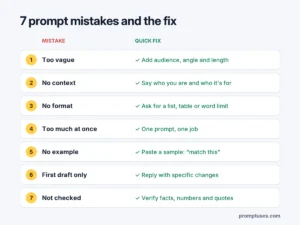
| What you got | Likely mistake | Try this |
|---|---|---|
| Generic, could be about anyone | #1 Too vague | Add audience, angle and length |
| Too basic or too advanced | #2 No context | Say who you are and who it’s for |
| Wall of text you have to reformat | #3 No format | Ask for a list, table or word limit |
| Several weak, rushed parts | #4 Too much at once | Split into steps |
| Right content, wrong style | #5 No example | Paste a sample and say “match this” |
| Close, but not quite | #6 Stopped too early | Reply with specific changes |
| A fact that seems off | #7 Didn’t verify | Check it and ask the AI to flag uncertainty |
Two bonus mistakes worth avoiding
Asking leading questions
“Why is my business idea great?” invites the AI to agree with you. If you want honest feedback, ask for it directly: “List the three biggest weaknesses in this business idea and how I could test each one.”
Sharing private information
It’s easy to paste a whole email thread or document without thinking. Remove passwords, bank details, ID numbers and private details about other people before you paste anything into an AI tool.
A simple pre-send checklist
Before you send an important prompt, run through these five questions. It takes about ten seconds.
- Did I say who it’s for?
- Did I say what I want, using a clear action word?
- Did I add context the AI can’t know?
- Did I say what the answer should look like?
- Is this one task, or should I split it?
If you want the full method behind this checklist, our guide on how to write a good AI prompt breaks down the five parts of a strong prompt with more examples.
Does this work on every AI tool?
Yes. These mistakes, and their fixes, apply to ChatGPT, Claude, Gemini, Microsoft Copilot and most other assistants. Each tool has its own strengths, which we compare in ChatGPT vs Claude vs Gemini, but a clear prompt helps all of them.
Frequently asked questions
What is the most common prompt mistake?
Being too vague. A short prompt with no audience, angle or length forces the AI to guess, and it usually guesses something generic. Adding just one or two details fixes most of these answers.
Why does ChatGPT give wrong answers?
AI assistants generate the most likely response based on patterns, not by looking up a verified fact every time. That means they can sometimes produce incorrect or made-up information, especially about specific numbers, quotes or obscure topics. Always check important facts.
How long should a good prompt be?
Long enough to remove guessing. One sentence is fine for simple questions. For writing, planning or analysis, three to six sentences that cover the audience, task, context and format usually work much better.
Is it better to start a new chat or keep refining?
Keep refining in the same chat when the answer is close, because the AI remembers the earlier context. Start a new chat when you switch to a completely different topic, so old details don’t confuse the new task.
Can I ask the AI to improve my prompt?
Yes, and it’s a handy trick. Paste your prompt and ask, “What information is missing from this prompt that would help you give a better answer?” Then add what it suggests.
Start with one fix today
You don’t have to fix all seven at once. Pick the one you recognise most, maybe it’s vague prompts, maybe it’s accepting the first draft, and focus on it for your next few conversations. You’ll notice the difference quickly.
Want prompts that already avoid these mistakes? Browse our ready-to-use writing prompts, marketing prompts and education prompts, each written with audience, context and format built in.